
Free Shortcut Virus Remover
USB files turned into shortcuts? Check your drive, see what each shortcut opens and decide what to remove. Shortcut Remover helps you get back to your files.
- Quick and full USB scans
- See suspicious shortcut targets
- Quarantine files with a restore option
- Show hidden files again
- Optional Microsoft Defender check
- Local scanning. No account needed.
Free download · Windows 10 & 11 · Version 8.0.1
64-bit Windows. Works offline. Your files stay on your computer.
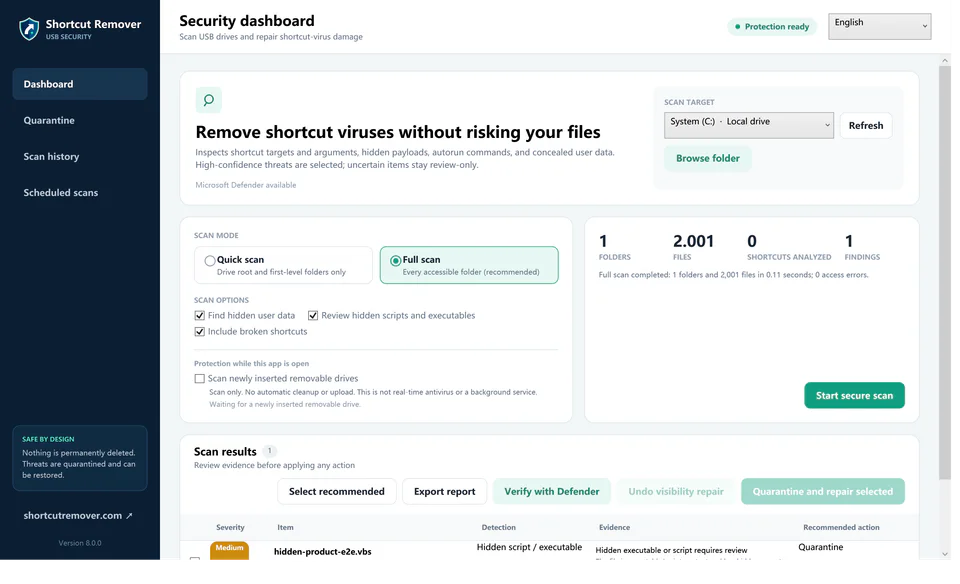
Check your USB drive in 3 steps
You choose the drive. You review the results. You stay in control.
1. Select
Connect your USB drive and choose its drive letter, or select a folder.
2. Scan
Run a full scan for complete coverage, or a quick scan for common locations.
3. Review
Read the findings and quarantine selected files. Restore an item if needed.
Free online tool
Check a shortcut before you open it
Choose a Windows .LNK file to inspect its target, arguments and common risk patterns. The file stays in your browser; nothing is uploaded or executed.
Open the .LNK checkerA pattern check cannot prove a file is safe. Scan suspicious files with your antivirus.
Choose a shortcut
Select one .LNK file, or paste its target and arguments.
Read the findings
Review the destination, command arguments and detected patterns.
Check the whole drive
Use Shortcut Remover for USB scanning, quarantine and hidden-file repair.
The tools you need for shortcut-virus cleanup
See what was found before changing anything on your drive.
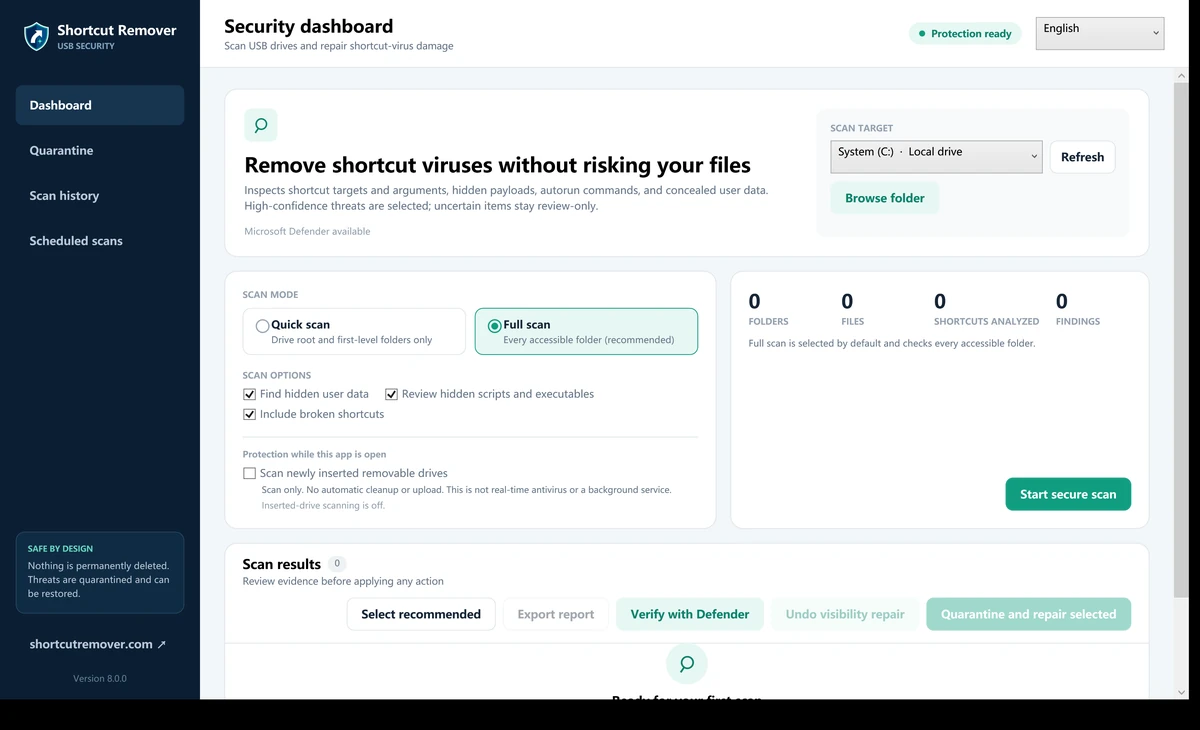
Check the whole drive, or start with a quick scan
A full scan checks accessible folders and reports the files inspected. A quick scan checks the drive root and its first folder level. Access errors and incomplete scans are shown in the results.
Find out what a shortcut actually opens
Review the target, command arguments and reasons an item was flagged. Ordinary .lnk files are useful Windows shortcuts; a shortcut file by itself does not mean your drive is infected.
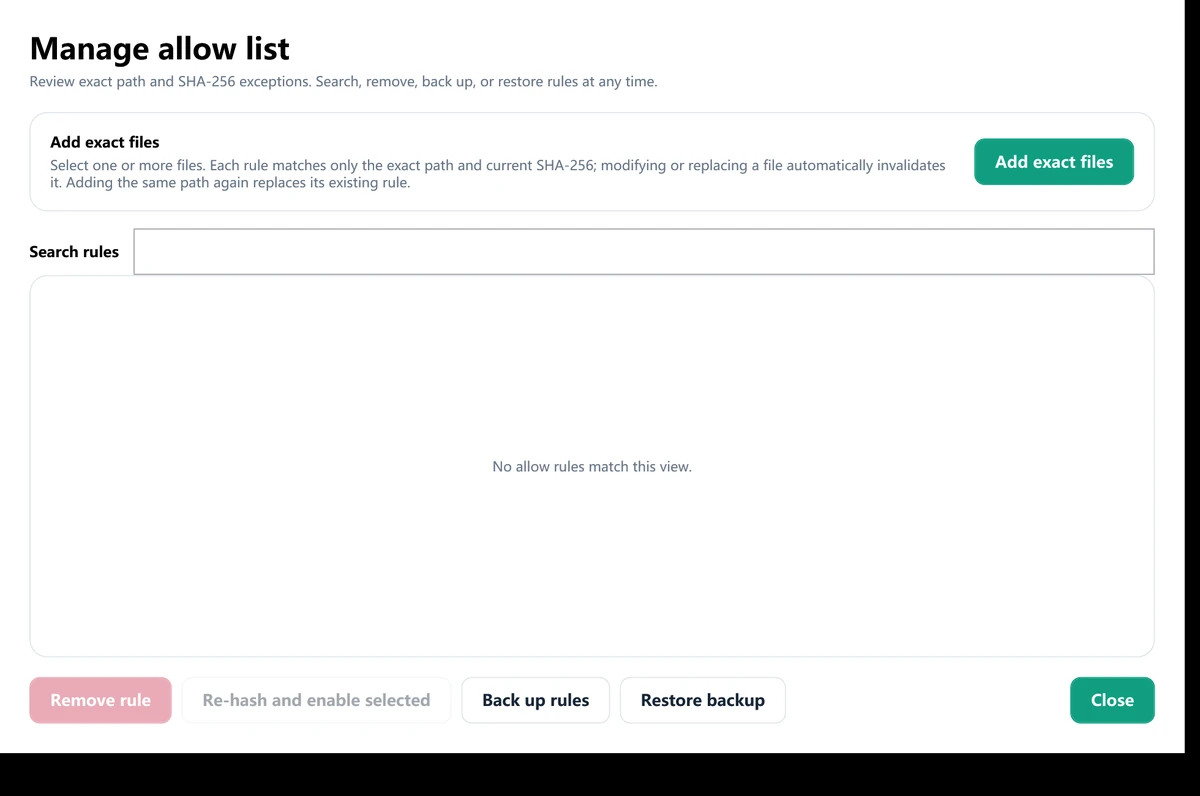
Move suspicious files aside with a way back
Quarantine only the findings you select. Shortcut Remover verifies stored files before restoring them. You can add a trusted item to the allow list after reviewing it.
Make existing hidden files visible again
Repair hidden and system attributes on the data you select after scanning. The latest visibility repair can be undone. This cannot recover files that were deleted, encrypted or overwritten.
Get a second check from Microsoft Defender
When Defender is available, request a custom scan from Shortcut Remover. Review its result alongside the shortcut findings. Shortcut Remover works alongside your antivirus software.
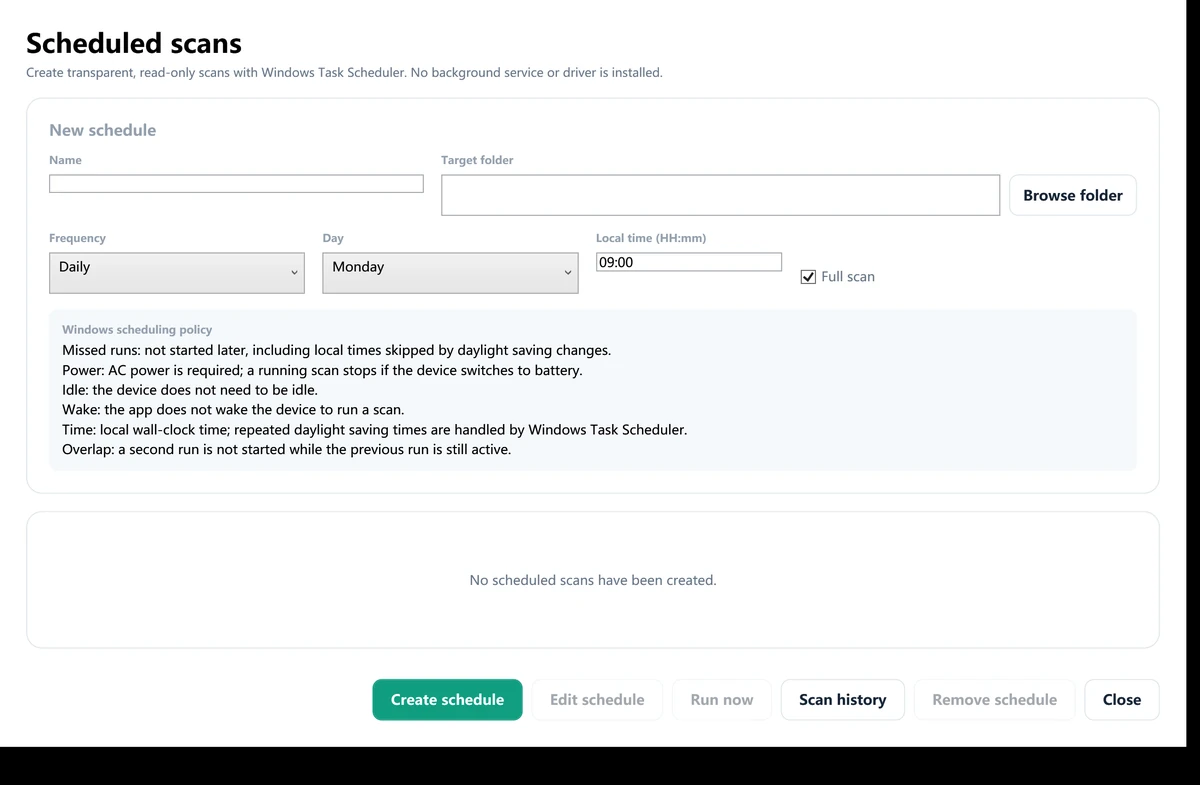
Keep a record and schedule the next check
Find previous results in Scan history, export a report and set daily or weekly checks. Scheduled scans inspect files and record results; cleanup remains your choice.
Your files stay on your computer
Scanning is local. There is no account to create and no upload step. Review findings before you choose quarantine or file-visibility repair.
No file uploads
The app checks files on the drive or folder you select.
A restore option
Quarantine keeps a verified copy of selected files.
A download you can check
The release has a public checksum and testing details.
Download Shortcut Remover for free
One installer for 64-bit Windows 10 and Windows 11. Requires .NET Framework 4.8 or later installed in Windows; no runtime is bundled.
Latest version — 8.0.1 · Installer size: 2.69 MiB
Download Free for WindowsInstaller and application digitally signed by Beijing Qingruan Chuangxiang Technology Co., Ltd.
System requirements
- Windows 10 or Windows 11
- 64-bit (x64) PC
- .NET Framework 4.8 or later installed in Windows
- A local folder or connected USB drive to scan
What's in version 8.0.1
- Hidden-file and folder visibility repair, with undo.
- Clear quarantine status when a USB drive is offline.
- Light and Dark themes; first launch defaults to English and Light.
- A smaller download using .NET Framework 4.8, without a bundled runtime.
Checksum & release details
Installer SHA-256B712AEAD4D63FF232F6694E5EC8AA65B08923AD73C548DB0465198026BA03A18
8.0.1-framework48-rk3024-20261014 · 2,819,920 bytes · .NET Framework 4.8+
Download checksum file · Read the release notes · All download information
Start with the problem on your drive
Practical help for USB shortcuts, hidden files and ordinary broken links.
USB files turned into shortcuts?
What to check before opening a suspicious file.
Read the guideCan't see the files on your USB drive?
Ways to show existing hidden files in Windows.
Read the guideShortcut virus or a broken shortcut?
Tell a missing target apart from suspicious behavior.
Read the guideQuestions about Shortcut Remover
How do I install Shortcut Remover?
Download the Windows installer and follow the setup steps. You need .NET Framework 4.8 or later installed in Windows. Keep your antivirus enabled. Setup may offer the optional RelevantKnowledge research software with a separate Agree/Decline choice. Declining does not affect installation or use of Shortcut Remover.
Which Windows versions are supported?
Shortcut Remover 8.0.1 supports 64-bit Windows 10 and Windows 11. It is not a Mac, Linux or mobile app.
Can I scan a USB drive without an internet connection?
Yes. The app scans files locally and works offline. Scanned files are not uploaded. Opening website links requires an internet connection.
Does every .lnk file mean there is a virus?
No. Windows uses .lnk files for normal shortcuts. Review the target, arguments and surrounding files before deciding that a shortcut is suspicious.
Can I restore a file from quarantine?
Yes. Select an item in Quarantine and restore it after reviewing it. The app verifies its stored copy. Restore & allow also creates an exact path and file-hash exception for a trusted file.
Can it recover deleted files?
No. Visibility repair clears hidden or system attributes on files that still exist. It cannot recreate deleted, overwritten, corrupted or encrypted files.
Does it replace my antivirus?
No. Shortcut Remover focuses on suspicious shortcut behavior and related USB damage. Keep Windows Security or another antivirus active. Optional Defender verification is available when Microsoft Defender can perform the requested scan.
Do scheduled scans remove files automatically?
No. Daily or weekly scheduled scans inspect files and add results to Scan history. Quarantine and repair are separate actions that you choose.
Ready to check your USB drive?
Download Shortcut Remover, choose the drive and review the results.
Download Free for Windows